
N560 – first impressions
I’ve been using the Fujitsu‑Siemens N560 for about a week. It’s my fourth PDA, so I can’t resist comparing it (mostly to the FS 720).
Mini‑review: what’s new? Not much, but there are a few things worth noting.
In the box – the usual: two styluses, a cradle, a cable adapter to use without the cradle, charger, a faux‑leather case, a Y‑USB cable (for USB host), a PocketLoox Choice coupon, and of course the N560 itself. No printed manual, not even on the CD. Siemens never disappoints in that department.
What makes the lack of a manual painful is the password‑lock issue: if you enable a password and mistype it a few times, the PDA locks permanently. The only fix is a service visit (60 EUR + 160 PLN). This really should be called out in a manual.
WM2003SE vs WM5 – the UI differences are small, but WM5 annoyed me with the pointless bottom bar, especially on the Today screen where every pixel matters. Luckily it can be removed with the right tweak: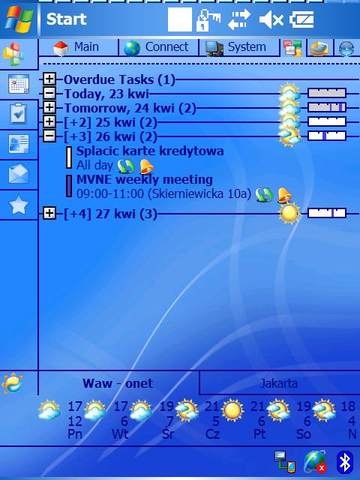
The only real advantage of WM5 is the new memory model, which in theory should improve battery life. I say “in theory” because at first the battery drained alarmingly fast. Update: after a few charge cycles it stabilized and now I get 2–3 days with fairly heavy use (daily Bluetooth sync, several address checks, and evening reading).
Bluetooth manager – the N560 ships with Microsoft’s BT manager. It feels less intuitive than the FS 720’s. I created a partnership… then had to figure out how to actually connect. I did get Outlook sync working over BT, which will be my main method. I use an SD reader for large files.
After a few days I found you can install the older FS‑720 manager. It works well and even adds a phone file‑transfer profile. The only downside: E2C stopped connecting over GPRS (although BT connections still worked). Not a big loss. Installation notes: http://www.firstloox.org/forums/showthread.php?t=6561.
ActiveSync + firewall – I lost time here. After installing ActiveSync I got a nice “Retrieving settings” message… and nothing. Is the device broken? After some intense googling I learned that ActiveSync + WM5 + an active firewall (Sygate in my case) is a bad combo. Even “Allow All” didn’t help; only stopping the firewall service did.
Later I found the real culprit: MTU size. With the default MTU, all packets were dropped by the firewall, even though ActiveSync was trusted. A small registry tweak on the N560 fixed it.
Preinstalled software – Mobile Office is improved, and I’m happy about the PowerPoint player. Finally, I can view presentations without converting them. It handles animations reasonably well, though it feels slow. Word and Excel also got upgrades and now handle native desktop formats without conversion.
Windows Media Player 10 – nothing exciting. In fact it feels slower and uses more memory than on the Dell v50 or FS 720.
Case – mostly the same, but the side scroll wheel is gone. I used that constantly on the 720, so this was a disappointment.
No camera – the 720’s camera was terrible, but I still used it for quick snapshots (whiteboards, notes). I miss having it.
Key backlight – looks great (nice blue), but I worry about the battery. Thankfully it can be disabled.
Screen – classic FS quality: great colors and sharpness.
Further notes (2007‑04‑23)
WLAN – forget the bundled Connectmobile E2C. It’s buggy and unnecessary. Install the patch that enables the “available networks” tab and Wi‑Fi becomes stable and usable.
GPS – it works, both in the car and on walks. The famous SiRF Star III chipset is fine, but not magical. My split: N560 in the car, Vista C for bike and walks.
Summary – FS delivered a very solid model: stable software, good performance (DivX at full resolution with subtitles works), and overall a device I can recommend.