
USB‑Serial adapter on Mac OS X
Even though the serial port is considered a “dead” interface, people still need it from time to time. On a Mac it’s possible — just not exactly painless.
I’ll assume you’re using the very common PL2303 chipset.
- First — you need PL2303 drivers.
- Software — I was able to launch
screenpretty quickly with:
screen /dev/tty.PL2303-0000201A(of course, replace the tty device with the port you actually connected to).
I saved that command as an iTerm bookmark and was happy… for a while.
- …until I tried to install Solaris 10 on a v490. For reasons I never figured out, while switching between installer screens all characters turned into gibberish. It didn’t make installation impossible, just painful. The workaround was to unplug and reconnect the cable (and refresh the installer screen, e.g. by opening Help).
Keyboard handling was even worse. I got to the partitioning screen and gave up — I couldn’t type anything. The garbled characters were probably a wrong baud rate; the keyboard issue likely required the right terminal profile in iTerm. After half a day I was done. The only thing that stopped me from throwing this “it just works” Mac out the window was the -10°C weather and strong wind outside.
Luckily I remembered I had minicom installed, which I used for connections via an XU870 card (but that’s another story).
a) Download and install minicom, e.g. from http://turin.nss.udel.edu/archive/minicom-2.2.pkg.zip or via Fink.
b) Open a terminal and configure minicom:
Kod:
sudo /opt/bin/minicom wwan -sSave the config under a name like serial.
Next time you can launch it without sudo or re‑configuring:
Kod:
/opt/bin/minicom serialYou can also save this as an iTerm bookmark:
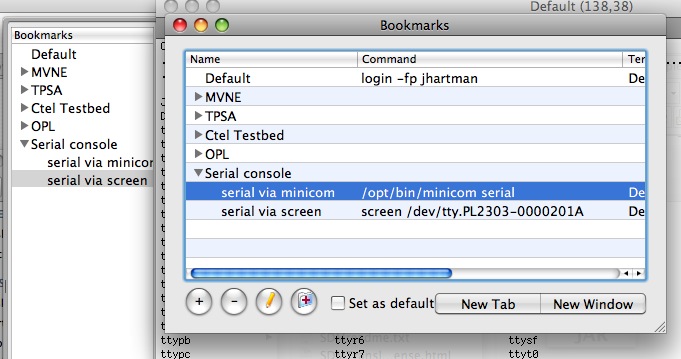
Once connected to the server (vt100 terminal), the keyboard works without issues (including cursor and function keys).
I made it through the installation and… went back to screen. Minicom doesn’t use the screen buffer in a way that lets you scroll back in iTerm’s side bar. So now I use whichever tool fits the situation.
This article originally appeared on the MyApple forum on 2008‑01‑05.